WhatsApp Accelerates ‘Liquid Glass’ UI Rollout for iOS Users

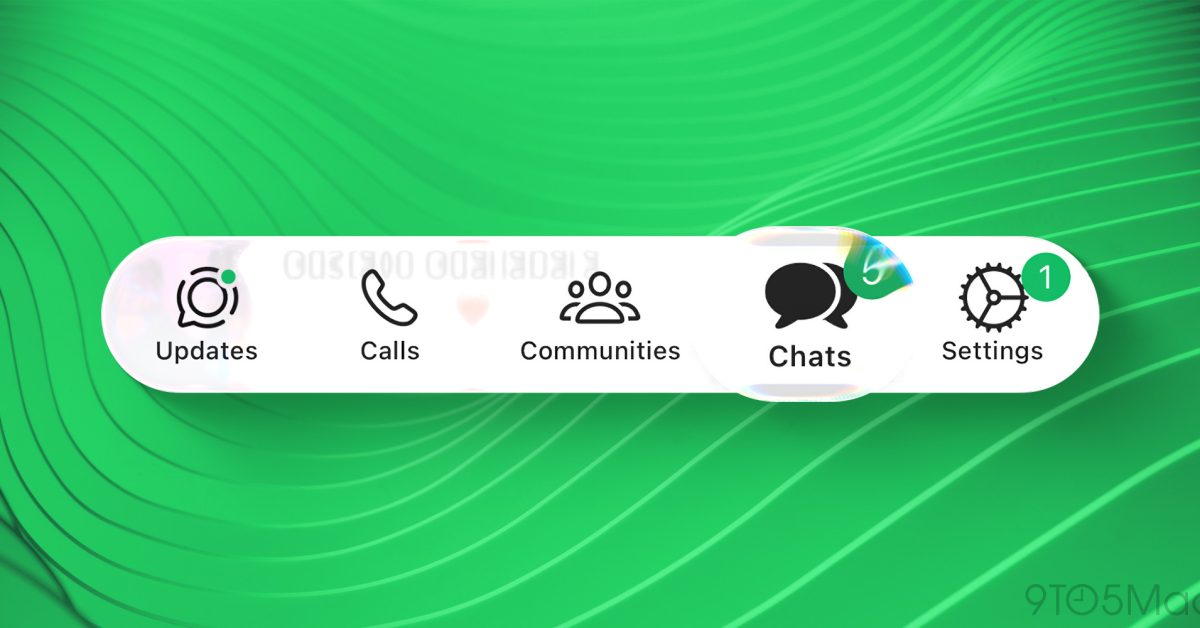
- WhatsApp is rolling out its 'Liquid Glass' design update to a wider range of iOS users after months of limited testing.
- The update focuses on a more translucent, modern interface, including refreshed top and bottom navigation bars.
- The rollout is currently partial, with many UI elements still awaiting the new aesthetic treatment, suggesting further updates in the pipeline.
A New Visual Era for WhatsApp on iOS
After an extended period of restricted beta testing, Meta is finally expanding its ambitious “Liquid Glass” design language across the WhatsApp ecosystem on iOS. This UI overhaul, which first surfaced in limited trials last October, represents one of the most significant aesthetic shifts for the messaging platform in recent years, aiming to align the app more closely with modern iOS design principles.
What is the Liquid Glass Redesign?
The Liquid Glass concept focuses on creating a more fluid, translucent, and layered interface. By moving away from flat, static backgrounds, the design introduces soft transparency effects and refined navigation components that feel native to Apple’s operating system. Previously, the changes were confined to minor tweaks in the bottom navigation bar and select elements within the Chats tab.
As of this week, users are reporting a more comprehensive deployment of these visual changes. Reports surfacing on social media indicate that the update is hitting a broader segment of the user base, introducing:
- Refined Navigation: A updated bottom tab bar that integrates seamlessly with the iOS system transparency.
- Top Navigation Overhaul: The main Chats interface now features a modernized top bar consistent with the Liquid Glass aesthetic.
- System Keyboard Integration: Enhanced support for the latest iOS keyboard, ensuring that the input experience feels cohesive with the overall design.
Phased Deployment and User Feedback
While the update is undoubtedly a step toward a more cohesive “Apple-centric” experience, the rollout is still in its infancy. Many components—such as the in-chat voice message player, message reactions, and various context menus—still retain the legacy interface. This suggests that Meta is utilizing a server-side phased rollout, likely to monitor performance and user reception before applying the new theme to the entire app.
Initial community reception has been mixed. While many users have praised the sleek, modern aesthetic, others have expressed concerns regarding navigation legibility and the departure from the familiar WhatsApp classic look. As Meta continues to polish these elements, it is expected that the remaining UI components will be transitioned to the Liquid Glass design in future incremental updates.
What This Means for iOS Users
For the average user, this update is a visual treat that reduces the “cross-platform” feel of WhatsApp, making it look and behave more like a first-party Apple application. If you haven’t seen the changes on your device yet, ensure your app is updated to the latest version via the App Store. The shift is being triggered server-side, meaning it may take a few more days to reach your specific region or account.



