Elevating the In-Car Experience: 5 New Ways to Customize CarPlay in iOS 26

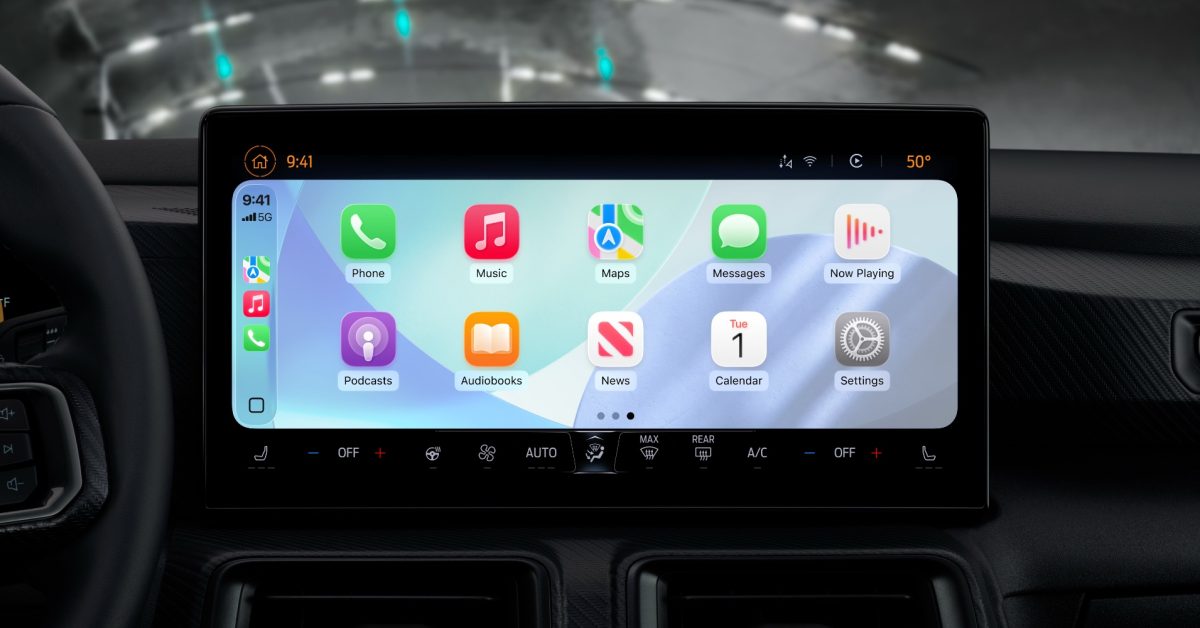
- Smart Scaling: The new 'Smart Display Zoom' feature automatically optimizes the CarPlay interface to fit the specific dimensions of any vehicle's display.
- Widget Stacks: Users can now add, remove, and manage up to five widgets per stack, with support for automated Smart Rotation.
- Enhanced Personalization: iOS 26 introduces dynamic wallpapers, system-wide text resizing for better accessibility, and visual icon modes like the transparent 'Liquid Glass' aesthetic.
Personalizing Your Drive: New Customization Features in iOS 26
With the release of iOS 26, Apple has significantly expanded the horizons for its in-car interface. CarPlay is no longer just a static mirror of your phone’s apps; it has evolved into a highly personalized dashboard that adapts to your vehicle’s unique display and your aesthetic preferences. Here is a deep dive into the five major ways you can now tailor your CarPlay experience.
1. Smart Display Zoom
One of the most requested features, Smart Display Zoom, intelligently scales the interface to suit the unique dimensions and resolution of your car’s screen. By navigating to Settings ⇾ Display within the CarPlay interface, users can toggle this feature to ensure maps, controls, and media remain perfectly aligned and readable, regardless of whether your car features a unique ultrawide or vertical orientation.
2. Advanced Widget Management
iOS 26 brings true widget support to CarPlay, allowing users to organize their Home Screen for maximum efficiency. You can now stack up to five widgets, choosing which information (such as Calendar, Weather, or Music) takes priority. Configuration is simple: head to Settings ⇾ General ⇾ CarPlay on your iPhone to manage your stacks and toggle the ‘Smart Rotate’ feature, which surfaces relevant information based on your current context or time of day.
3. Dynamic Wallpaper Integration
Aesthetics are key to a modern cockpit. iOS 26 introduces six new wallpaper options that sync with your system’s light or dark mode. These backgrounds are designed to match the current iOS 26 aesthetic, providing a cohesive transition from your iPhone home screen to your vehicle’s dashboard. You can switch these easily via the in-car Settings app.
4. System-Wide Text Scaling
Accessibility is at the forefront of this update. For the first time, users can adjust the global text size directly within CarPlay. By visiting Settings ⇾ Accessibility ⇾ Text Size, drivers can increase legibility for navigation or menu items, ensuring that critical information is always easy to read at a glance without compromising road safety.
5. Refined App Icon Customization
Finally, Apple has introduced icon appearance settings that allow users to choose between ‘Default,’ ‘Dark,’ or ‘Clear’ styles. The ‘Clear’ setting provides a sleek, transparent ‘Liquid Glass’ look, which integrates beautifully with the wallpaper options. These can be adjusted independently for day and night cycles, allowing for a highly curated visual experience.
By offering these granular controls, Apple is making it clear that CarPlay is intended to be as personal as the iPhone itself. Whether you prioritize data density via widgets or visual clarity through display zooming, iOS 26 provides the tools to make your commute truly your own.



