Elevate Your Aesthetics: How to Customize the New Pride Luminance Wallpaper on iOS 26.5

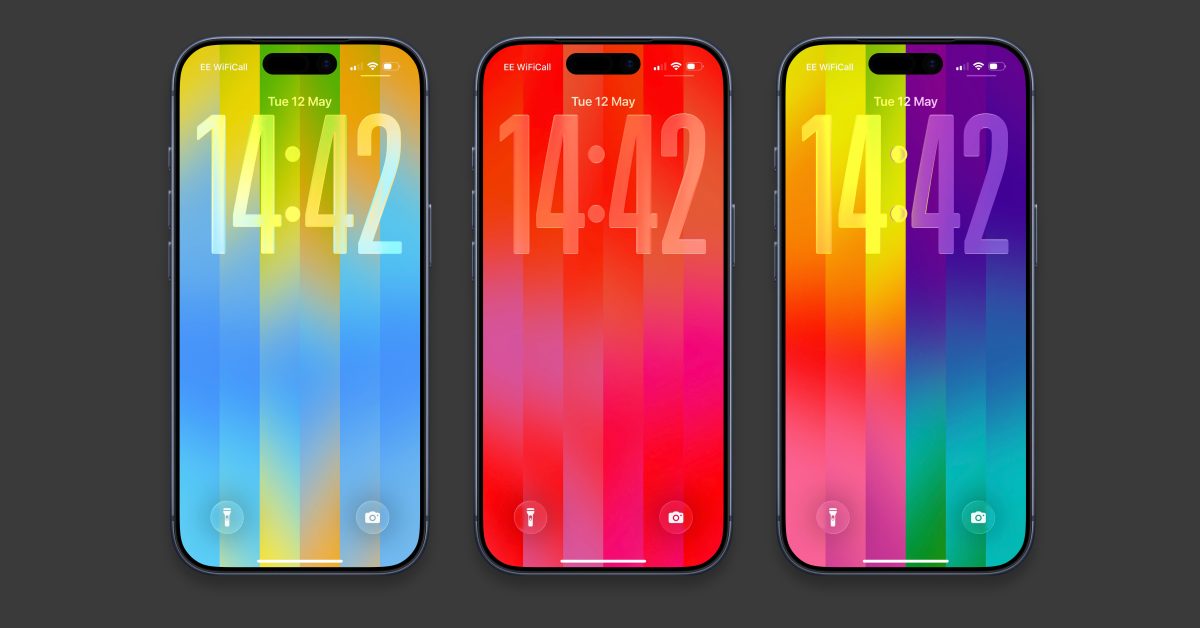
- Update Required: Ensure your device is running iOS 26.5 or watchOS 26.5 to access the new Pride Luminance feature set.
- Deep Personalization: Users can select up to 12 custom colors to define their lock screen gradient, moving beyond the standard preset themes.
- Unified Design: The customization options extend to the Apple Watch, allowing users to create a matching, synchronized aesthetic across their entire Apple ecosystem.
Mastering the New iOS 26.5 Pride Luminance Wallpaper
Apple has officially rolled out the iOS 26.5 update, bringing a fresh, vibrant aesthetic to iPhone users worldwide. The centerpiece of this release is the ‘Pride Luminance’ wallpaper—a dynamic, color-shifting design that creates a seamless visual transition when moving from your lock screen to your home screen. While the default configuration offers a striking homage to the LGBTQ+ community, the true beauty lies in its deep personalization options.
Getting Started: Installation and Setup
Before you can begin curating your digital workspace, ensure your device is running the latest software. To update your iPhone, navigate to Settings > General > Software Update. Once you have successfully installed iOS 26.5, follow these steps to access your new wallpaper:
- Long-press your lock screen to trigger the Wallpapers Gallery.
- Tap the ‘plus’ (+) button to create a new wallpaper configuration.
- Scroll down until you locate the ‘Pride’ section.
- Select ‘Pride Luminance’ and tap ‘Get’ to download the asset to your device.
Crafting Your Custom Palette
Apple hasn’t just given us a static image; they have provided a powerful design tool. After opening the Pride Luminance editor, swipe through the ten pre-installed aesthetic themes to see if any match your current vibe. If you are looking for something truly unique, keep swiping until you reach the ‘Custom’ option.
By tapping the pencil icon, you enter the color-picking interface. This feature allows you to select up to 12 distinct colors, giving you complete control over the stripes’ gradient and tone. Whether you prefer muted, autumnal earth tones or high-contrast, neon-inspired palettes, the tool offers immense flexibility. You can further refine the experience by customizing your clock font, color, and widgets to ensure your lock screen is both functional and cohesive.
Expanding the Experience to Apple Watch
The customization doesn’t stop at your phone. If you are an Apple Watch user, you can synchronize your style by updating to watchOS 26.5. Simply navigate to the Watch Face Gallery in your Watch app, select the Pride Luminance face, and apply the same custom 12-color palette you created for your iPhone. To edit this on the fly, long-press your watch face, tap ‘Edit,’ and scroll through the Digital Crown to toggle between your presets and your custom swatches.
With these tools, Apple continues to push the envelope on user-driven personalization, proving that mobile security and performance updates can also come with a flair for design.



