Tailoring Your Drive: 5 New Ways to Customize CarPlay in iOS 26

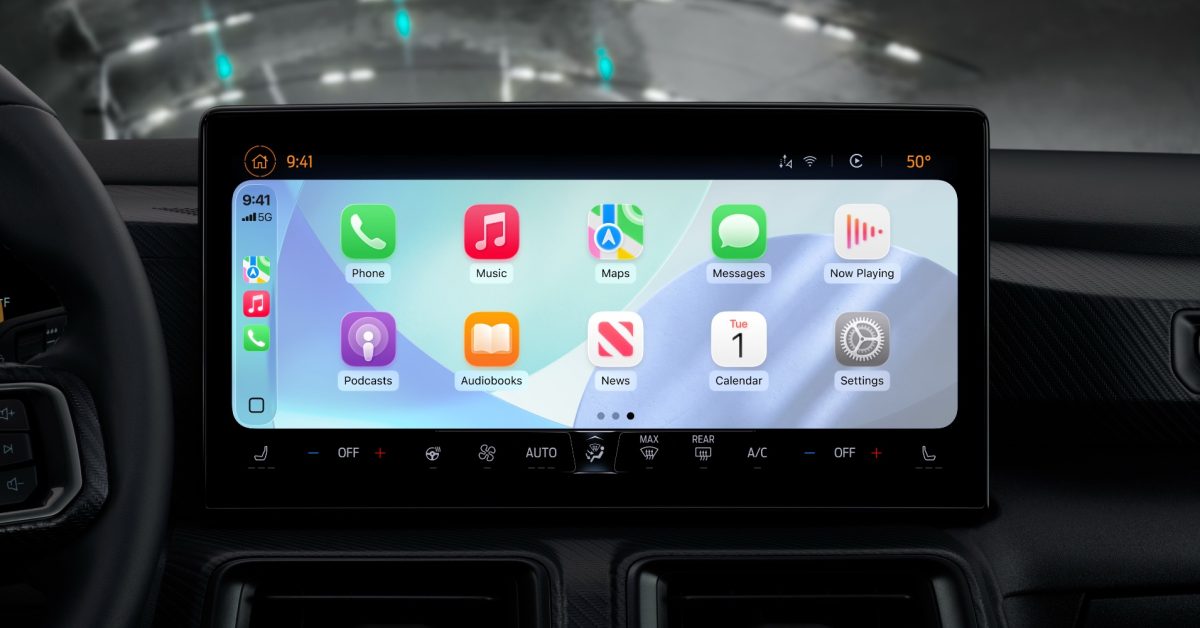
- Enhanced Visuals: iOS 26 introduces dynamic wallpapers and a "Liquid Glass" icon aesthetic for a more modern, personalized dashboard.
- Customizable Workspaces: Users can now add or remove widgets in their dashboard stacks and optimize screen layout with the new Smart Display Zoom feature.
- Improved Accessibility: Drivers can now adjust systemwide text sizes, ensuring better readability and comfort during navigation.
Elevating the In-Car Experience with iOS 26
Apple has consistently refined its automotive interface, but the latest iteration—iOS 26—represents a significant leap forward in personalization. While CarPlay has long been praised for its intuitive, safe-driving design, iOS 26 finally hands the reins of aesthetic and functional control over to the driver. Whether you are looking for better screen optimization or a fresh visual look, these new features transform your dashboard into a truly bespoke interface.
1. Smart Display Zoom
One of the most notable additions is Smart Display Zoom. Designed to tackle the wide variety of screen aspect ratios in modern vehicles, this feature optimizes how the CarPlay UI maps to your specific dashboard hardware. By toggling this on in the CarPlay Settings app, users can often achieve a more tailored fit that prevents awkward scaling or wasted screen real estate, ensuring critical information is displayed at the ideal density for your specific vehicle.
2. Advanced Widget Management
Widgets are no longer exclusive to the iPhone Home Screen. In iOS 26, users can finally curate their CarPlay dashboard widgets. By navigating to Settings ⇾ General ⇾ CarPlay on your iPhone, you can now manage your widget stacks. You can add or remove up to five widgets per stack and toggle “Smart Rotate” to keep your most relevant information, such as weather or navigation, front and center.
3. Dynamic Wallpapers
Personalization is also getting a aesthetic boost with six brand-new wallpaper options. These designs mirror the default iPhone aesthetic and are fully dynamic, shifting their appearance automatically based on your light or dark mode settings. It is a simple yet effective way to harmonize your car’s digital aesthetic with your personal mobile setup.
4. Systemwide Text Resizing
Accessibility is a cornerstone of Apple’s design philosophy, and iOS 26 brings robust text scaling to CarPlay for the first time. If you find the default interface difficult to read at a glance, you can now adjust the text size systemwide. This ensures that navigation instructions and song titles are clear and legible, adhering to the high accessibility standards set by the broader iOS ecosystem.
5. Refined App Icon Customization
Finally, users can now dictate the look of their app icons. Beyond the standard layout, iOS 26 offers ‘Default,’ ‘Dark,’ and ‘Clear’ appearances. The new ‘Clear’ option is particularly striking, applying a translucent ‘Liquid Glass’ effect that makes the interface feel modern and sophisticated. These settings can be configured independently for light and dark modes, allowing for a deep level of visual refinement.
As Apple continues to blur the line between the iPhone and the automobile, these features demonstrate a commitment to making the driving experience as personalized as the device in your pocket. Which of these features will you be enabling first?



