Google Gemini Overlay Receives Dynamic Color Integration and Interface Streamlining

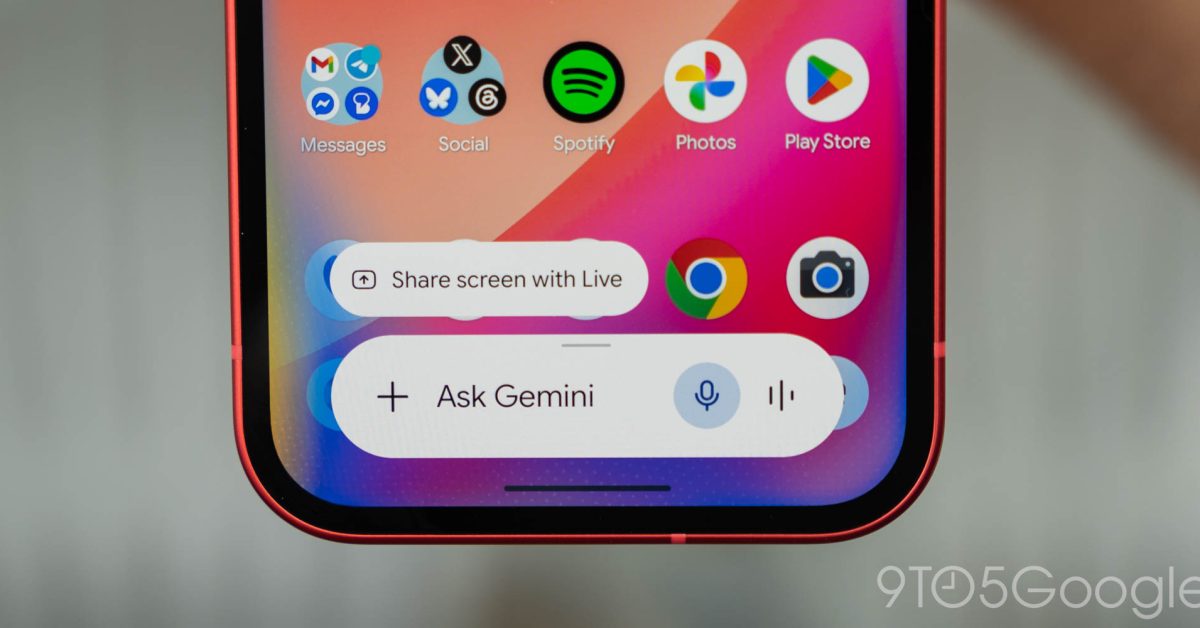
- Google is updating the Gemini Android overlay with Material You's Dynamic Color support for improved visual consistency.
- The 'Screen content' capture tool has been moved to the primary tool carousel for faster access.
- Changes are rolling out via the Google app, with the UI update appearing in beta version 17.28 and tool reorganization available in stable version 17.26.
Enhancing the Gemini Android Experience
Google is continuing to refine its AI-powered assistant experience on Android. Following the recent ‘Neural Expressive’ redesign unveiled at I/O 2026, the tech giant is rolling out subtle but meaningful UI improvements to the Gemini overlay. These updates focus on aesthetic cohesion through Dynamic Color integration and improved navigation efficiency for power users.
Dynamic Color Brings Aesthetic Harmony
One of the most noticeable changes in the latest update is the implementation of Material You’s Dynamic Color within the Gemini overlay. This shift moves away from the previously static, neutral gray elements, allowing the assistant’s interface to better align with the user’s system-wide wallpaper and theme settings.
- Dark Mode Refinement: The text input field and secondary UI chips now intelligently adopt system accent colors, creating a more immersive dark mode experience.
- Light Mode Adjustments: While more subtle, users will notice refined tinting in the overlay sheet and enhanced vibrancy in the carousel option visuals when the light theme is active.
Interestingly, these aesthetic updates are currently exclusive to the overlay, as the full-screen Gemini chat interface has yet to receive the same Dynamic Color treatment. These changes are currently being pushed out via version 17.28 of the Google app beta.
Streamlining ‘Screen Content’ Access
Beyond visual changes, Google is prioritizing functionality by re-organizing the tool carousel. The ‘Screen content’ feature—a vital utility that allows users to capture and query information directly from their current display—has been moved to a more prominent position.
Previously buried within the expanded list of tools alongside Personal Intelligence, ‘Screen content’ now occupies a space on the main carousel. It sits conveniently alongside high-traffic options like Photos, Camera, Files, Drive, and Notebooks. By surfacing this tool, Google is significantly reducing the friction involved in cross-referencing AI responses with live on-screen data.
How to Access the New Features
These updates are reaching users across different channels. The ‘Screen content’ relocation is widely available in the stable release (version 17.26 and higher). If you have updated your Google app but do not see the changes, users are encouraged to perform a ‘Force stop’ on the application via Android settings to clear the cache and trigger the new interface elements.
As Google continues to iterate on its AI ecosystem, these updates highlight a clear focus on making Gemini not only more powerful but also more deeply integrated into the native Android experience.



